Back to cameras so what is “Shutter speed”

Shutter speed is the amount of time your camera’s shutter stays open when you take a photo. It controls two things: motion and brightness. A fast shutter speed (like 1/500 or 1/1000) freezes movement—great for birds, sports, or kids. A slow shutter speed (like 1/30, 1/10, or 1 second) lets motion blur—useful for silky waterfalls, light trails, or creative blur.

It also affects exposure: slower shutter speeds let in more light and make the photo brighter; faster shutter speeds let in less light and make the photo darker.

Handheld rule of thumb: use about 1 divided by your focal length (50mm ≈ 1/50, 200mm ≈ 1/200) to avoid camera shake, unless you have stabilization.

“Remember When” Digital Images with a IBM PC 286 or was it 386 ?

In the late 1980s and early 1990s, digital images on personal computers were more promise than practicality. The IBM PC 286 was a capable machine for its time—reliable, business-oriented, and widespread—but it simply wasn’t built for serious graphics. Memory addressing was limited, storage was slow, and graphics modes were primitive by modern standards.

https://upload.wikimedia.org/wikipedia/commons/thumb/6/69/IBM_PC_AT.jpg/250px-IBM_PC_AT.jpg

Early image work on a 286 meant crude tools: DOS paint programs, monochrome or 16-color VGA, and files small enough to fit on floppy disks. Scanning a photo could take several minutes, and every operation felt risky. Crashes were common, and undo functions were minimal or nonexistent. You learned quickly that mistakes were expensive.

The real turning point came with the 386 processor. It introduced protected mode and expanded memory addressing, which made more advanced software possible. When Photoshop 1.0 appeared in 1990, it required a 386—not because Adobe wanted to exclude users, but because the math and memory demands simply couldn’t run on a 286. Even then, performance was slow unless you had what felt like extravagant hardware: multiple megabytes of RAM and a fast hard drive.

By modern standards, those systems were painfully limited. Yet those limits shaped habits. Editing was deliberate. Cropping, contrast, and retouching were planned before execution. There was no casual experimentation, no infinite undo stack, no layers to bail you out later.
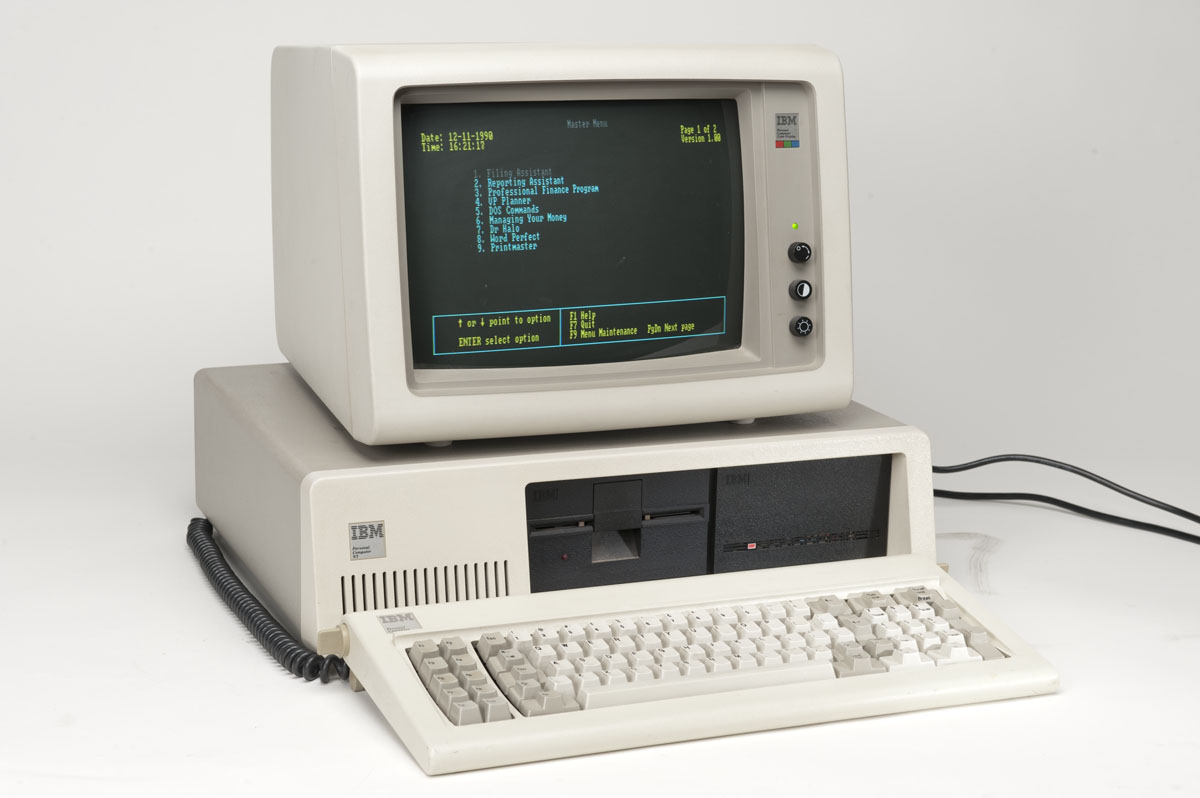
https://www.dosdays.co.uk/computers/IBM%20PC-XT-286%20%285162%29/images/ibmpcxt_5160.jpg

That early digital era bridged film and pixels. It was awkward, slow, and fragile—but it laid the groundwork for everything that followed. Today’s effortless image editing rests on lessons learned when every click mattered and every saved file felt like a small victory.
F-stops

An f-stop is the setting on a camera lens that controls how wide the aperture opens. The aperture is the hole inside the lens that lets light reach the camera’s sensor. F-stops are written as numbers like f/2, f/4, f/8, and f/16. Here’s the counter-intuitive part: smaller numbers mean a wider opening, and larger numbers mean a smaller opening.

Each full f-stop change either doubles or halves the amount of light entering the camera. Going from f/4 to f/2 lets in twice as much light. Going from f/4 to f/8 cuts the light in half. This predictable pattern is why f-stops matter so much in exposure.

F-stops also control depth of field, which is how much of the scene appears sharp from front to back. Wide apertures (low f-numbers) create shallow depth of field, blurring backgrounds and isolating subjects. Narrow apertures (high f-numbers) increase depth of field, keeping more of the scene in focus.

In practice, you choose an f-stop based on creative intent first, then adjust shutter speed and ISO to balance exposure. Portraits often favor wide apertures for soft backgrounds, while landscapes usually need smaller apertures for overall sharpness and clarity.